
How To Fax From Outlook
Click to see general instructions for Sending faxes with FAXAGE
Have a newer version of Office or Office 365 than version 2016?
This documentation is for older/legacy office functionality. For newer versions of Office, we recommend utilizing the Print to Fax FAXAGE print driver. The print driver will allow for printing to fax from any Windows application, including but not limited to Office.
Microsoft Office 2003, 2007, 2010, 2013 or 2016 Internet Fax
FAXAGE integrates with Microsoft Office 2003, Microsoft Office 2007, Microsoft Office 2010, Microsoft Office 2013, or Microsoft Office 2016 (also versions of 2013 and 2016 known as Office 365) with the help of an install script available below. Once installed, sending a fax over the Internet through Microsoft Office 2003/2007/2010/2013/2016 applications (such as Word 2003, Word 2007, Word 2010, Word 2013, Word 2016 or directly from Outlook) can be accomplished by following the screen shots below:
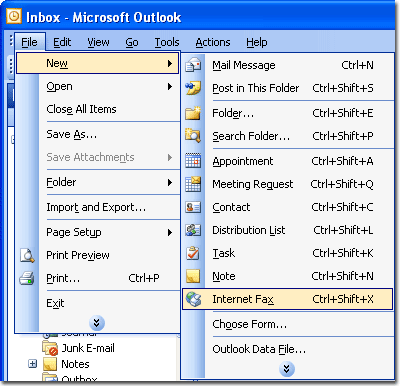
Outlook 2003 Example:
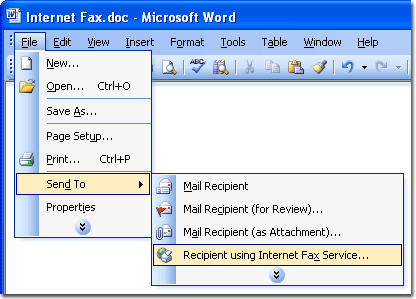
Word 2003 Example:
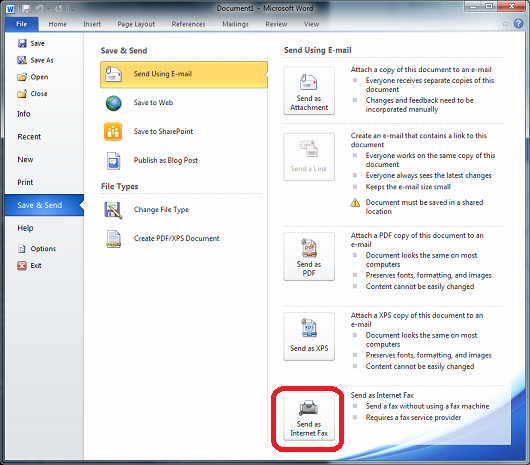
Word 2013 Example:
Instructions
Requirements:
- You must have Microsoft Office 2003, Office 2007, Office 2010, Office 2013 or Office 2016 installed on your computer.
- Outlook needs to be your default email client.
- Your email address must be a valid user in the FAXAGE system.
- Microsoft has disabled the Internet Fax feature in Office 2003 and 2007 on 64-bit versions of Windows.
- If you are running a 64-bit version of Windows (such as Windows 7 or Vista Business 64-bit), you must have Office 2010 or greater.
- According to Microsoft, Internet Fax is not available on Windows Vista Starter, Windows Vista Home Basic, or Windows Vista Home Premium for any Office version - i.e.: You must have Vista Business if you run Windows Vista.
- Your copy of Office 2003/2007/2010/2013/2016 needs to be enabled to use the Internet Fax feature as follows:
Download
- Click to Download the FAXAGE Office Integration Files
- Choose to save the file
- Choose a location to save the file to
Install
- Close all Office programs (Outlook, Word, etc.)
- Right-click the zip file you just downloaded
- Select "Extract"
- Right-click the FAXAGE_Office_Install.reg file and select "Merge"
Uninstall
- Right-click the FAXAGE_Office_Remove.reg file and select "Merge"
Microsoft and the Office logo are trademarks or registered trademarks of Microsoft Corporation in the United States and/or other countries.
FAXAGE® is a registered trademark of EC Data Systems, Inc.
© Copyright 2004-2024 EC Data Systems, Inc. all rights reserved